Updated: January 14, 2026
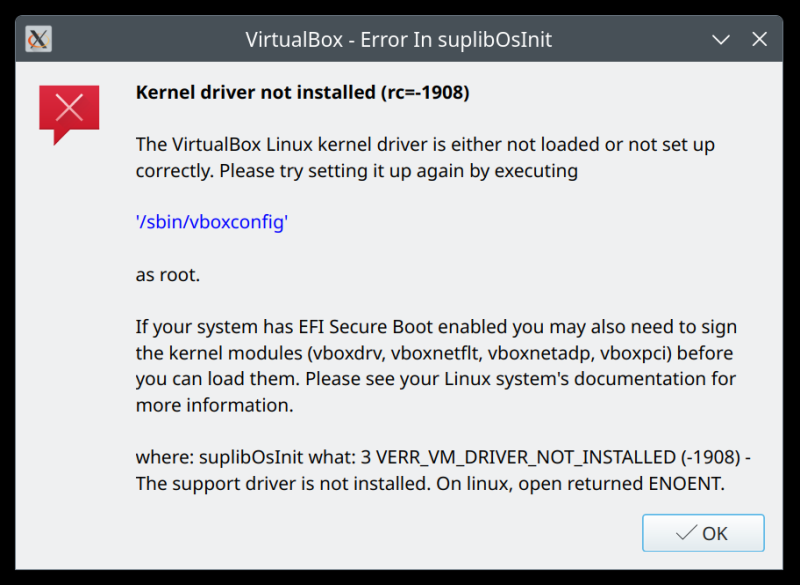
Linux. Things work, until they don't. Nothing like getting a horrible error JUST when you need to do some actual work, or some important task. Case in point, as outlined in my Slimbook Executive report 12, VirtualBox suddenly wouldn't launch any guests. The error said: Kernel driver not installed (rc=-1908). The VirtualBox Linux kernel driver is either not loaded or not setup correctly. Please try setting it by executing ... Yes, indeed. This popup suddenly showed when I tried to fire up one of the virtual machines. Annoying and frustrating, especially since I've not really made any changes to VirtualBox in quite a while.
As instructed, I ran the /sbin/vboxconfig command, and it informed me that my system was missing the necessary kernel headers to compile the driver for the running kernel. I then remembered I had recently upgraded the kernel on the box, from 6.8 to 6.14, but for some reason, VirtualBox hasn't been auto-configured with this change. Anyway, let me show you quickly the issue, all of the interesting details, and then how to fix this, so you can be on your merry way.
Problem in more detail
The error message in the popup is quite verbose, and somewhat misleading. The simpler, more elegant way is to run the /sbin/vboxconfig command in a terminal window, and see what comes up. The actual text and the details will be different.
sudo /sbin/vboxconfig
vboxdrv.sh: Stopping VirtualBox services.
vboxdrv.sh: Starting VirtualBox services.
vboxdrv.sh: Building VirtualBox kernel modules.
This system is currently not set up to build kernel modules.
Please install the Linux kernel "header" files matching the current kernel
for adding new hardware support to the system.
The distribution packages containing the headers are probably:
linux-headers-generic linux-headers-6.14.0-35-generic
This system is currently not set up to build kernel modules.
Please install the Linux kernel "header" files matching the current kernel
for adding new hardware support to the system.
The distribution packages containing the headers are probably:
linux-headers-generic linux-headers-6.14.0-35-generic
There were problems setting up VirtualBox. To re-start the set-up process, run
/sbin/vboxconfig as root. If your system is using EFI Secure Boot you may need to sign the
kernel modules (vboxdrv, vboxnetflt, vboxnetadp, vboxpci) before you can load them. Please see your
Linux system's documentation for more information.
What happened is as follows: I have a new kernel, but NOT the kernel leaders. This means the system cannot recompile drivers for the new kernel. Thus, VirtualBox cannot run. The question is, of course, why the program wasn't properly configured during the kernel upgrade, but that's a different problem. In essence, it's the lack of suitability of Linux for desktop use. In this particular case, a Kubuntu 24.04 system. Or rather, Ubuntu.
Solution
The fix is rather simple. Install the missing packages. The actual list will be different based on your distro and its particular version, and even the use of the command-line package manager may be different. For me, on the Kubuntu 24.04 system (Ubuntu essentially, with apt), the one-line is as follows:
sudo apt install linux-headers-generic linux-headers-6.14.0-35-generic
Rerun /sbin/vboxconfig. The drivers should recompile and load, and you ought to be able to continue using VirtualBox normally. And now you can accomplish that important task.
Conclusion
What I've always found sorely missing in the Linux desktop is the philosophical, product-driven approach. Every tool does its own thing, with zero regard to anything else. Developers develop, but they don't think about the actual user experience. You install a new kernel, why not "suggest" recompiling a bunch of stuff? Why not suggest headers? Or at least check if they were used with the previous kernel? There are tons of options here that would allow a more streamlined user experience. Not have a person suddenly become a system admin when they actually want to do real, important things.
Luckily, the resolution of the driver loading issue here is quite simple. But, as I outlined in my report above, this is only one of the two problems I had to handle. In a follow-up guide, I will show you yet another totally avoidable issue, and one that is a pure, pure regression, as it never should have happened. For now, may your virtual machines run true.
Cheers.